Getting a training plan out of ChatGPT takes two minutes. The problem shows up the second time: you explain your goal again, your training days again, the knee trouble from last winter again. And because you are tired, you leave half of it out — and get a plan that fits somebody else.
A coach you set up once fixes that. The custom GPT used to be that — and OpenAI is retiring it. The successors are plugins and skills: you can use them, but building your own needs a business or education account. What works on every plan is a ChatGPT project. How to do it is below — and you do not have to start from scratch: you can take our finished training coach exactly as it is.
At a glance
You set up a training coach in ChatGPT as a project now, not as a custom GPT — OpenAI is retiring those on 11 December 2026. A project does the same job and is available on every plan according to OpenAI, free included. Our finished training coach comes as a ZIP: either attach it to a chat for a quick test, or set up a project once where the instructions and the reference material stay in place. What matters more than the route is what the prompt says — above all, the rule that it asks before it plans.
Stay on top of AI training & analysis? One click — and Google shows you my articles first.
As of 18 September 2026, OpenAI is retiring custom GPTs on 11 December 2026. Creating new ones is no longer possible on personal accounts according to the documentation — not even private ones — though some people still see the button, because the rollout is uneven. Existing GPTs can still be edited until the retirement date.
Custom GPT, plugin or project: which route fits you
Which route suits you depends less on your plan than on whether you want a single look or something you will keep using.
Route
For whom
Lasting?
Attach the ZIP to a chat
trying it out, any plan
only inside that one chat
Set up your own project
anyone actually training with it
yes, instructions and reference stay in place
Install it as a skill
accounts with a Skills area in ChatGPT
yes, but with no training history
Start with the first. If you like how the coach asks, the project takes five minutes.
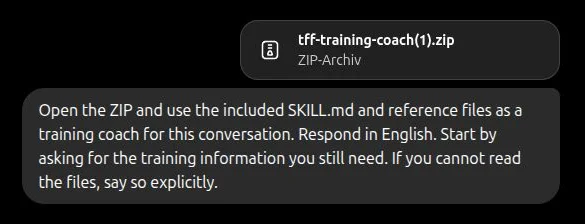
Open a new chat in ChatGPT, attach the ZIP file and send this along with it:
Prompt
Open the ZIP and use the included SKILL.md and its reference files as a
training coach for this conversation. Start with whatever questions about
my training are still open. If you cannot read the files, say so explicitly.
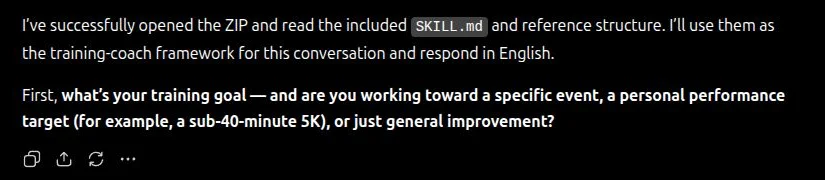
That last sentence is deliberate. Without it a model tends to keep guessing rather than admit it cannot reach the files — and you only notice at the finished plan that it came from nowhere. In our run the confirmation came straight back: "I've successfully opened the ZIP and read the included SKILL.md and reference structure."
Attach the ZIP and start the training coach for this conversation
The coach starts by asking about the training goal
For feedback and adjustments you reopen that same chat. Nothing is installed; the ZIP applies to this conversation only. That is enough for a test and for the first few weeks, but it gets unwieldy eventually, because a chat does not grow indefinitely.
Tested with a Pro account and package version 2.5.4, using fictional training profiles rather than real health data. For Free, Go and Plus the practical test is still outstanding — and their upload limits apply on top.
Set up a ChatGPT project: your training coach in five steps
This is the route I would recommend once you are actually training with it. A project is its own area in ChatGPT with its own instructions and its own files — exactly what a custom GPT used to be, minus the expiry date.
In ChatGPT, choose New project on the left and give it a name, something like "My training coach".
Inside the project go to ⋯ → Project settings → Instructions and paste in the entire contents of project-setup/PROJECT-INSTRUCTIONS.md.
Use Add files to upload project-setup/tff-training-reference.md.
Start a chat inside the project and write: "Build my training plan. Ask me for whatever is still missing."
From then on you open that project for training and for feedback. The instructions and the reference file stay in place; you upload nothing twice.
Two details I tripped over while building this, which you can skip: the instructions field holds 8,000 characters, so project-setup/ contains a version that fits exactly — you do not have to shorten anything. And the reference material for running, strength and mixed sits in a single file rather than three, because a project on the free plan allows only five files. That leaves room for your own tracking files.
What the prompt says: the rules behind the training plan
This is where a useful coach parts ways with one that produces generic plans. Four things are in the instructions.
First, the rule that matters most: ask, then plan. A good coach does not hand you a plan before knowing your goal, your time frame, your current volume and your limitations. That is what the instructions enforce — without goal, training days, session length and training status there is no plan. Say "just do it" and you get a question back.
Second, the safety check that runs before everything else. Chest pain, dizziness, a swollen calf or a fever mean an immediate stop and a referral to a professional, on the first mention rather than the third. That applies mid-conversation too, before a plan exists at all.
Third, the sports-science principles it works from: load and recovery in balance, intensity steered by perceived effort, increases kept small and never in volume and intensity at once. Anything that cannot be backed up is not in there as a rule — blanket minimum weeks and fixed heart-rate ceilings were deliberately removed.
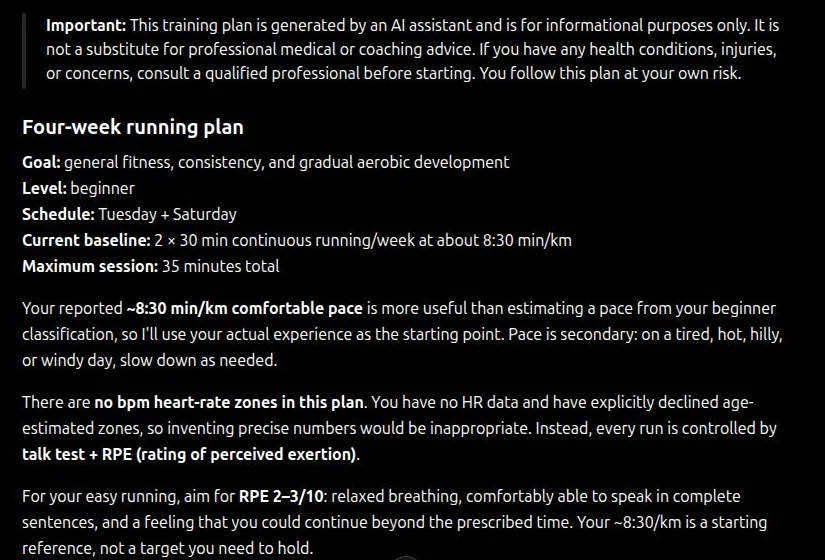
And fourth, the limits. The coach says what it cannot do, and it does not invent anything. In the test run without HR data it wrote exactly that: "There are no bpm heart-rate zones in this plan. You have no HR data and have explicitly declined age-estimated zones, so inventing precise numbers would be inappropriate." Intensity ran on duration, talk test and perceived effort instead. It treated the stated pace as what it is, too: "Your ~8:30/km is a starting reference, not a target you need to hold."
1 / 2
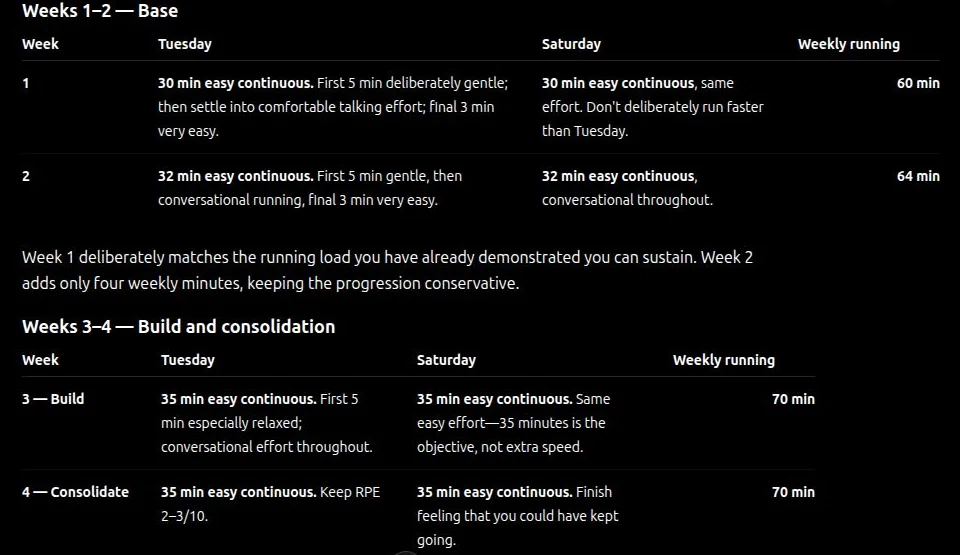
The plan names its baseline and invents no heart-rate zones
The four weeks at a glance: sessions and weekly volume
All of it is readable and yours to change. The instructions file is deliberately plain text, not a black box — which is exactly why I am showing you what is in it here.
In seventeen years working with athletes I have barely seen a plan that was right on the first draft. The coach is no different. It gets good when you push back in the second round and it corrects itself properly.
Adapting the training plan instead of starting over
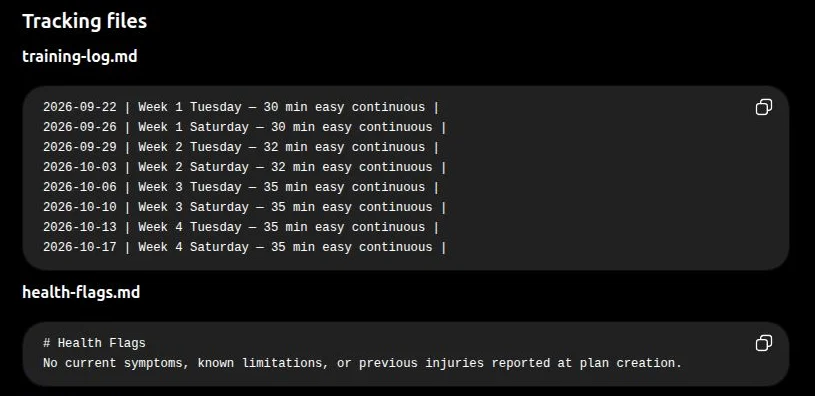
At the end of every plan the coach outputs three templates: a training log, a list for complaints and warning signs, and a short summary of your current plan with phase, pace and — where they exist — heart-rate zones. Those three are its memory. They are not saved automatically; you copy them into your project.
Then the coach reads them next time, recognises the running plan and goes straight into adjustment mode instead of interviewing you again. A custom GPT never could do that, incidentally — according to OpenAI it started every conversation from zero, with no memory of the previous one. A project can.
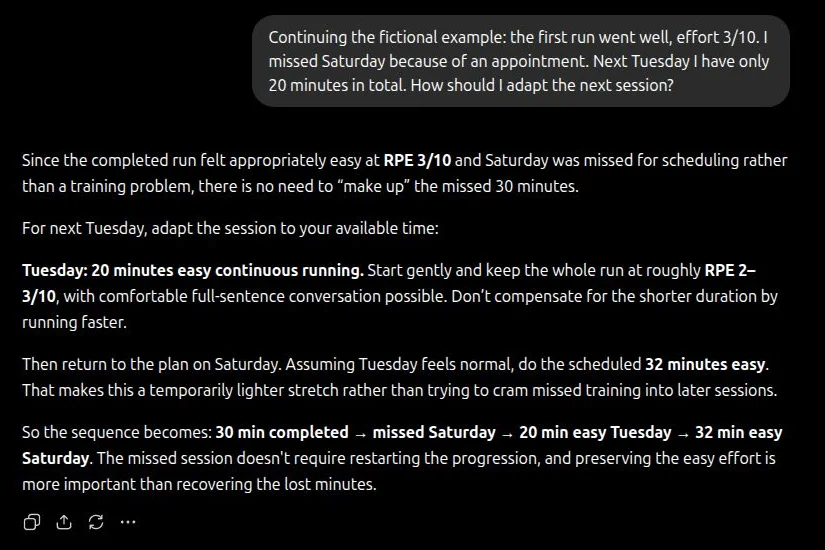
What that looks like in practice is in the second screenshot: one run went fine, Saturday was missed because of an appointment, and only 20 minutes were left for the following Tuesday. The coach does not make the missed run up — "there is no need to 'make up' the missed 30 minutes" — shortens the session cleanly to 20 minutes and says plainly that the lost minutes are not pushed into later sessions: "preserving the easy effort is more important than recovering the lost minutes." That is how you tell whether a rule set is worth anything.
1 / 2
Copyable templates for the training log and health notes
Feedback changes the plan: nothing gets made up, the next session is capped at 20 minutes
Without a project none of that happens. You then paste the summary and the log into the start of each new chat. Works the same, just more by hand.
Adapting the coach to your sport and your data
A template is a starting point, not a finished state. Four places are worth your time.
Your sport first: a running plan needs different logic than a strength or multisport plan. Say clearly where the focus sits. Then your periodisation model, if you prefer one — linear progression, blocks, or undulating. Third, your data as standing context: if you work with resting heart rate, an HRV trend or a VO2max estimate regularly, write into the instructions that the coach should ask for them and use them. And fourth, the tone: some people want compact tables, others a short rationale for every session. Either one is a single line.
ChatGPT skills and plugins: who can actually use them
Some accounts show an area called "Plugins" in ChatGPT with a "Skills" tab. That route would be direct: Create → Upload from your computer, pick the ZIP, wait for the scan. The coach would then be permanently available without you attaching anything.
According to OpenAI's documentation that is intended for eligible Business, Enterprise, Healthcare and Edu accounts; Free, Go, Plus and Pro are not listed. So we could not reproduce it ourselves — and in trying, I ran into a trap you will probably hit too.
The Skills tab you may be looking at might belong to Codex, not to ChatGPT. Codex is OpenAI's developer environment, it lives inside the same desktop application, and it brings its own plugin and skill directory. The difference is right there in the heading: "Extend Codex with task-specific skills". Mistake that for the ChatGPT skills area and you install something that never shows up in your normal ChatGPT conversations.
A second point that is easy to miss: installing it stores no training history on its own. For a coach that follows your weeks you still need a project and the three tracking templates.
What an AI training coach cannot do
It cannot see how you squat, does not measure your heart rate while you train, and has no idea that you are standing at the bar on four hours of sleep. The plan is only as good as the context you give it beforehand — no better.
And above all it does not replace knowing how to judge its output. An AI plan always looks plausible: cleanly formatted, full of numbers, and it justifies itself. Whether the 33 minutes in week 3 are right for you, whether the progression fits the injury you had last year, whether an important question never got asked — only someone with a rough idea of what a good plan looks like will spot that. No skill in the world takes that off your hands, and the better the instructions get, the more plausible the mistakes sound too.
That is exactly why this article spells out what the instructions contain. If you know the rules, you also notice when the coach does not follow them. That is the difference between a tool you use and one that uses you.
My advice for getting started: attach the ZIP to a chat today, have it build you a week, disagree with it somewhere and watch how it corrects itself. If that holds up, set up the project — at the latest when you find yourself explaining the same thing twice.